Click the link “Manage Privileges” in the left navigation menu and the following screen will be displayed.
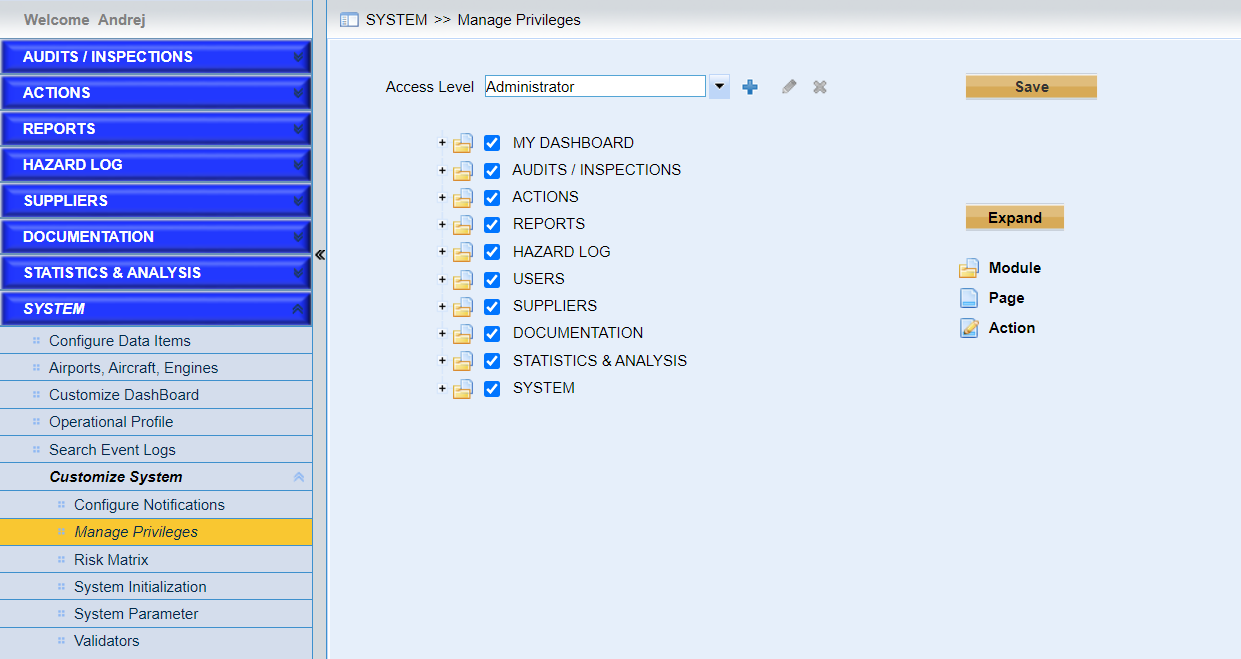
The configuration of privileges in IMX system is very flexible. Users can create the access levels and assign them privileges easily.
Please follow the following steps to configure the privileges.
•Choose one existing access level in the dropdown list
Note |
⟡Users can only create access levels under existing Power User and User. ⟡Only one administrator access level is allowed in IMX system. ⟡Administrator, Power User, and User groups are not allowed to be edited, and deleted. |
•Configure the privileges.
➢Configure the privileges of groups first.
Only the privileges configured for the groups are available for the access levels belong to the groups.
➢Configure the privileges of access levels belong to the groups
•Add a new access level
Click the icon  to add a new access level. As the following screen shows,
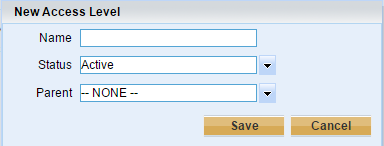
Users need to specify the parent access level for the new one. The new access level will inherit all of the privileges of the parent access level.
If the status is “Inactive”, the access level cannot be assigned to users.
•Click the icon  to edit one access level.
•Click the icon  to delete one access level.
Privileged users can delete the access levels created by users. The pre-defined access level cannot be deleted.
•Click the button “Save” to save the current access level.
•Click the button “Collapse” to collapse all the privileges and “Expand” to expand all of them.