Click the link “Customize Sub-forms” in the “System Initialization” page and the following screen will be displayed.
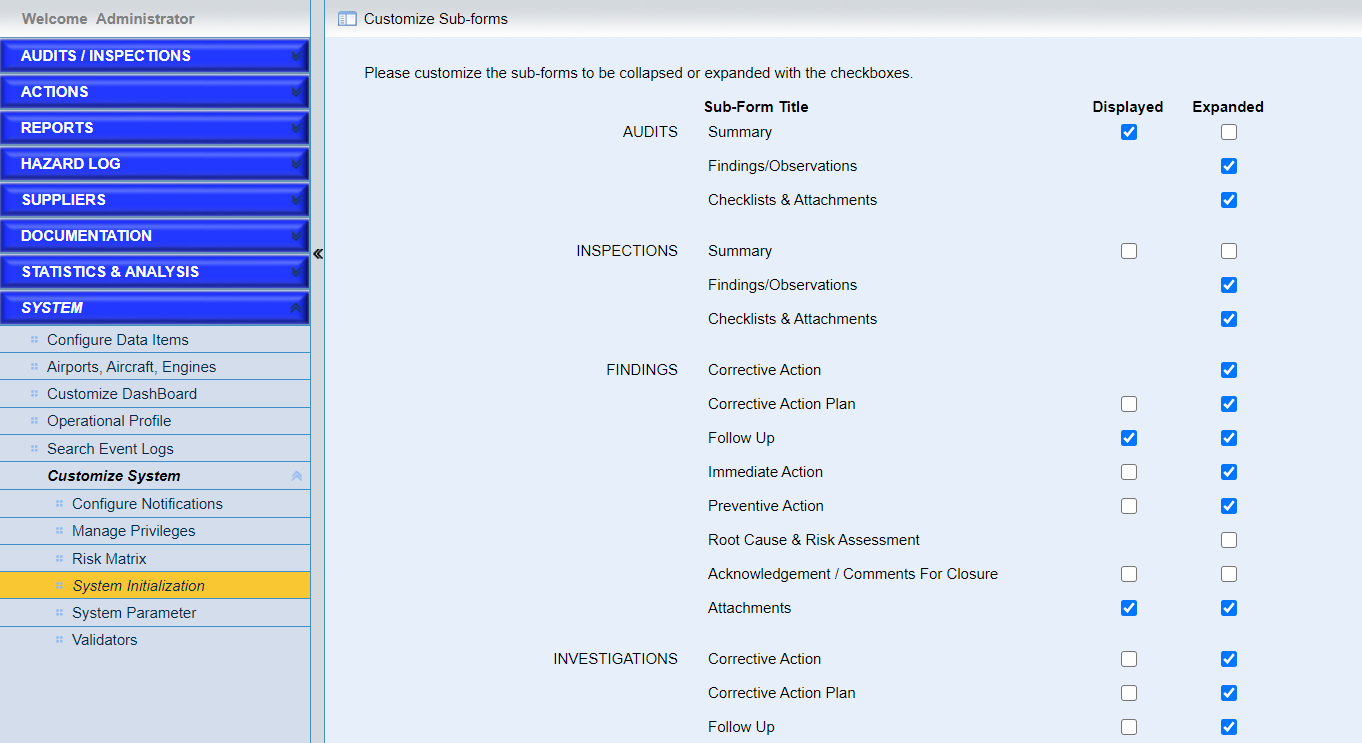
Users can set the sub-forms listed here to be displayed or expanded based on their preferences.
The default configurations are listed in the page.
•Configure the “Displayed” attribute
Tick the checkbox corresponding to one sub-form, the sub-form will be displayed by default when one record, i.e. audits, findings, is open.
Note |
❖For FINDINGS and INVESTIGATIONS, the configuration of “Displayed” will NOT take effects on the records created before version V3.5. However, for the records created in the previous versions in other modules, this configuration will take effect. ❖For all the records in all the modules created in V3.5, the “Displayed” attribute will take effect on them. |
• Configure the “Expanded” attribute
Tick the checkbox corresponding to one sub-form, the sub-form will be expanded by default when one record, i.e. audits, findings, is open.
Note |
This configuration will take effect on the records created both in previous versions and version 3.5. |